Meet Elwin: The Display Font That Commands Attention
There's a moment in every creative project where the typography either fades into the background or steps forward to make a statement. If you've been searching for a typeface that refuses to blend in, Elwin might be exactly what your next design needs. This isn't a font that whispers—it speaks with confidence, personality, and a distinct artistic edge that immediately draws the eye.
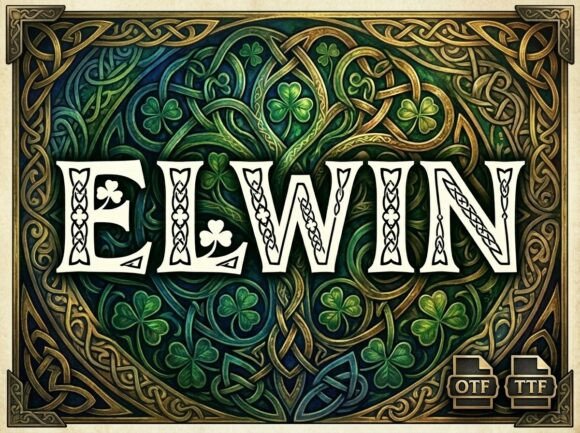
What sets Elwin apart from the hundreds of display fonts available today? It starts with its visual character. Every letterform has been crafted with deliberate artistic detail, giving each capital letter the weight and presence of a standalone design element. The strokes carry a boldness that feels intentional rather than heavy-handed, and the overall aesthetic walks a fascinating line between contemporary flair and timeless sophistication. For designers who appreciate typefaces that feel like they were made by someone who genuinely cares about letter construction, Elwin delivers that level of craftsmanship.
Where Elwin Truly Shines: Practical Applications
Understanding where a display font like Elwin fits into real-world projects helps you make smarter design decisions. Because this is an all-caps typeface—meaning it includes uppercase letters only—it's specifically engineered for situations where impact matters more than extended reading. Think of it as the font equivalent of a spotlight. You wouldn't use it for body text in a novel, but you'd absolutely reach for it when a headline needs to stop someone mid-scroll or when a logo needs to feel distinctive at any size.
Here's where Elwin becomes a genuinely useful tool in your design toolkit:
- Logo Design and Brand Identity: A strong logo often relies on typography that feels memorable. Elwin's artistic personality makes it a compelling choice for brands that want to project creativity, confidence, and originality. Whether you're designing for a boutique coffee roaster, an independent clothing label, or a creative agency, the font's distinctive letterforms can anchor an entire visual identity system.
- Packaging Design: Shelf presence matters. When a product sits alongside dozens of competitors, the typography on the packaging plays a massive role in whether someone picks it up. Elwin's bold, decorative style works beautifully for product names, flavor labels, or collection titles on everything from cosmetics to craft beverages.
- Social Media Graphics: Platforms like Instagram, Pinterest, and TikTok reward content that grabs attention in fractions of a second. Using Elwin for quote graphics, announcement posts, or story headers gives your content a polished, editorial quality that stands apart from the default fonts most creators rely on.
- Posters and Event Materials: Concert posters, festival branding, gallery announcements, and event flyers all benefit from typefaces that feel artistic and intentional. Elwin's decorative nature makes it particularly well-suited for creative events where the visual design should reflect the energy of the occasion.
- Website Headers and Hero Sections: Web design often calls for a typeface that makes an immediate impression above the fold. Pairing Elwin with a clean sans serif or a simple serif font for body copy creates a dynamic visual hierarchy that guides visitors through your site.
- Merchandise and Apparel: T-shirt designs, tote bags, stickers, and other branded merchandise often rely on bold, readable type that looks good at various scales. Elwin's strong visual personality translates well to physical products where the typography needs to work on its own without supporting imagery.
- Invitations and Editorial Layouts: Wedding invitations, magazine covers, book chapter headings, and editorial spreads all benefit from typefaces that add a sense of occasion. Elwin brings that elevated, artistic quality without feeling overly formal or stuffy.
Making Typography Work Harder for Your Brand
One of the most overlooked aspects of building a recognizable brand is typography consistency. When you choose a font like Elwin for your headlines and pair it thoughtfully with complementary typefaces for supporting text, you create a visual language that audiences begin to associate with your brand over time. This isn't just about aesthetics—it's about building recognition. Think about how quickly you can identify a Nike ad or a Vogue cover, even from a distance. Typography plays a significant role in that instant recognition.
For small business owners and entrepreneurs, investing in a premium font like Elwin can actually save time and money in the long run. Instead of cycling through free fonts that thousands of other brands are also using, you're working with a typeface that carries its own distinct identity. That originality translates directly into how professional your brand appears to potential customers, partners, and collaborators.
Smart Pairing Strategies
Because Elwin is a decorative display typeface designed for headlines and high-impact moments, pairing it with the right supporting font is essential. The goal is contrast without conflict. Here are some approaches that tend to work well:
- Elwin + Clean Sans Serif: Fonts like Montserrat, Open Sans, or Lato provide a neutral, readable counterbalance to Elwin's decorative energy. This combination works particularly well for websites, presentations, and marketing materials where you need both personality and legibility.
- Elwin + Classic Serif: Pairing Elwin with a refined serif like Playfair Display or Lora creates an editorial aesthetic that feels sophisticated and intentional. This is a strong choice for magazine layouts, lookbooks, and premium brand collateral.
- Elwin + Simple Script: For projects like wedding invitations or feminine brand identities, combining Elwin with a delicate script font can create a beautiful visual rhythm—just be careful not to pair two highly decorative fonts together, as they'll compete for attention.
The key principle? Let Elwin do the heavy lifting for headlines, titles, and focal points, then step back with your supporting font for everything else. This creates a clear visual hierarchy that makes your designs easier to navigate and more pleasant to experience.
Important Details Before You Start Designing
Before committing to any font for a project, it's worth reviewing what you're actually getting. Elwin comes in two industry-standard file formats: OTF (OpenType Font) for advanced design software like Adobe Illustrator, InDesign, and Photoshop, and TTF (TrueType Font) for broader compatibility across different devices and applications. Having both formats means you can use the font whether you're working in professional design suites or simpler tools like Canva or even word processing software.
It's also worth reiterating that Elwin is an all-caps display typeface. This means every letter is uppercase—there are no lowercase characters included. For many design applications, this is actually an advantage. All-caps typography naturally creates a sense of authority and visual uniformity that works powerfully for headlines, logos, and decorative initials. However, if your project requires mixed-case text for extended passages, you'll want to pair Elwin with a complementary font that includes a full character set.
When testing any new typeface, set aside time to experiment before committing to a final design. Try Elwin at different sizes, adjust letter spacing, and see how it looks against various background colors and textures. Typography that looks stunning on a white mockup might need spacing adjustments on a dark background, and vice versa. This kind of hands-on testing is what separates good design from great design.
Choosing Fonts That Reflect Your Creative Vision
Typography is one of the most powerful tools in visual communication, yet it's often the last thing people think about when starting a project. The fonts you choose send immediate signals about quality, personality, and professionalism—often before anyone reads a single word. A typeface like Elwin communicates that you value originality and aren't afraid to make bold creative choices.
Whether you're building a brand from scratch, refreshing an existing visual identity, or working on a one-time creative project, the right display font can elevate the entire composition. Elwin offers that rare combination of artistic distinction and practical versatility, giving you a typeface that feels special without being impractical. For designers, creators, and business owners who want their typography to work as hard as they do, it's a worthwhile addition to any font library.